
Find Login in the lobby
Select Visit Wild Card City to open the casino. The account platform carries the Joka name. In its header, choose Login, beside the yellow Register button. This opens the sign-in window for returning players.

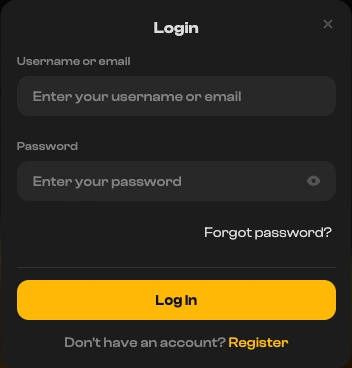
Sign in with a username or email
- In Username or email, type the username you chose at registration or the email address associated with that account.
- Enter your current Password. If your browser fills both fields, check the username first. A shared device may have saved several accounts.
- Select the yellow Log In button. If the form rejects your details, check the address for a typing error. If you cannot recall the password, use the recovery link in this window.
Get a reset code by email
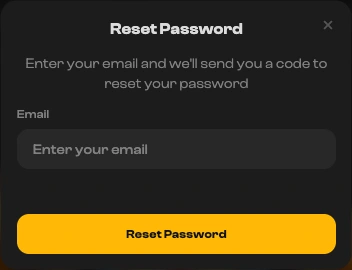
Choose Forgot password? to open Reset Password. This screen asks for an email address, even if you usually sign in with your username.
Enter the address attached to the account and select Reset Password. Open that inbox and follow the instructions in the code email. Once you have changed the password, return to Login and enter the new one.
If you still cannot get in
- The email has not arrived
- Check the spelling of the address you submitted, then look in junk or spam. If you no longer control that inbox, use Contact Us on the operator platform and explain which account detail you have lost.
- Your phone keeps entering the old password
- Clear the filled password field and enter the new password yourself. Once it works, update the saved entry for that username on each device you use.
- You have a VIP invitation
- Start with the regular Login button, then open VIP in the casino menu. If an invitation is missing, give support its name and date. Keep passwords and reset codes private.
New to the platform? See the illustrated registration guide. To save the lobby on your phone, follow the mobile browser instructions.